

드래그하면,Drag‑select.
번역됩니다.Translated.
마우스를 놓는 순간, 원문과 번역이 Chrome 사이드 패널에 나란히 놓입니다. 번역은 기기 안에서 처리되므로 읽고 있는 글이 어디로도 전송되지 않습니다.Snap Translate puts the original sentence and its translation side by side in Chrome's panel — the moment you let go of the mouse. It runs on your machine, so nothing you read is ever uploaded.
텍스트 바이트bytes of your text
sent to a server
번역할 수 있는 문장sentences a day
on the free tier
번역 언어target languages
side by side
가입하면 무제한for Pro too —
sign up, unlimited
번역기를 켜지 않습니다. 읽던 흐름 그대로.You don't open a translator. You keep reading.
사이드 패널을 한 번 엽니다Open the side panel once
툴바 아이콘을 누르거나, 선택한 텍스트에서 우클릭 → “선택한 텍스트 번역”을 고릅니다. 패널은 읽는 동안 계속 열려 있습니다.Click the toolbar icon — or right-click a selection and choose “Translate selected text”. The panel stays open while you read.
언어를 한 번 골라 둡니다Pick your languages once
원문은 자동으로 감지되고, 번역 언어를 한두 개 고르면 그대로 유지됩니다. 처음 쓰는 언어쌍은 진행률 바와 함께 모델을 한 번만 내려받습니다.Source is auto-detected; choose one or two targets and the choice sticks. A new language pair downloads its model once, with a progress bar.
이제 드래그만 하면 됩니다Then just drag-select
단어든 구절이든 문단 전체든, 패널이 즉시 갱신됩니다. 듣기·복사·PDF 저장도 그 자리에 있습니다.A word, a phrase, a whole paragraph — the panel updates instantly. Listening, copying and PDF export are right there.
선택한 텍스트는 기기를 떠나지 않습니다The text you select never leaves the device
Chrome에 내장된 온디바이스 모델이 처리합니다. API 키도, 번역 서버도, 계정도 필요 없고 비행기 안에서도 작동합니다.Chrome's built-in on-device model does the work. No API key, no translation server, no account — and it still works on a plane.
드래그 한 번, 우회 없음One drag, no detour
복사도, 붙여넣기도, 탭 이동도 없습니다. 마우스를 놓는 순간 패널이 갱신됩니다.No copying, no pasting, no tab switching. The panel updates the moment you let go.
문장마다 한 쌍A pair per sentence
문단 전체를 선택하면 문장마다 번역이 따로 붙어, 읽던 자리를 놓치지 않습니다.Select a whole paragraph and each sentence gets its own translation, so you never lose your place.
줄바꿈이 살아 있습니다Line breaks survive
화면에서도, 클립보드에서도, PDF에서도 원문의 문단 구조가 그대로 유지됩니다.Screen, clipboard and PDF all keep the paragraph structure of the original.
듣고, 전체 복사하고, 검색 가능한 PDF로 내보내기Listen, copy all, or export a searchable PDF
원문과 번역은 각자의 목소리로 읽어 줍니다. “전체 복사”는 화면 순서를 그대로 지키고, “PDF로 저장”은 이미지가 아니라 실제로 선택되는 텍스트로 A4 세로 인쇄본을 만듭니다.Each side is read aloud in its own voice. “Copy all” keeps the order shown, and “Save as PDF” prints portrait A4 with real, selectable text — not an image.
평범한 읽기의 세 장면.Three moments from a normal read.
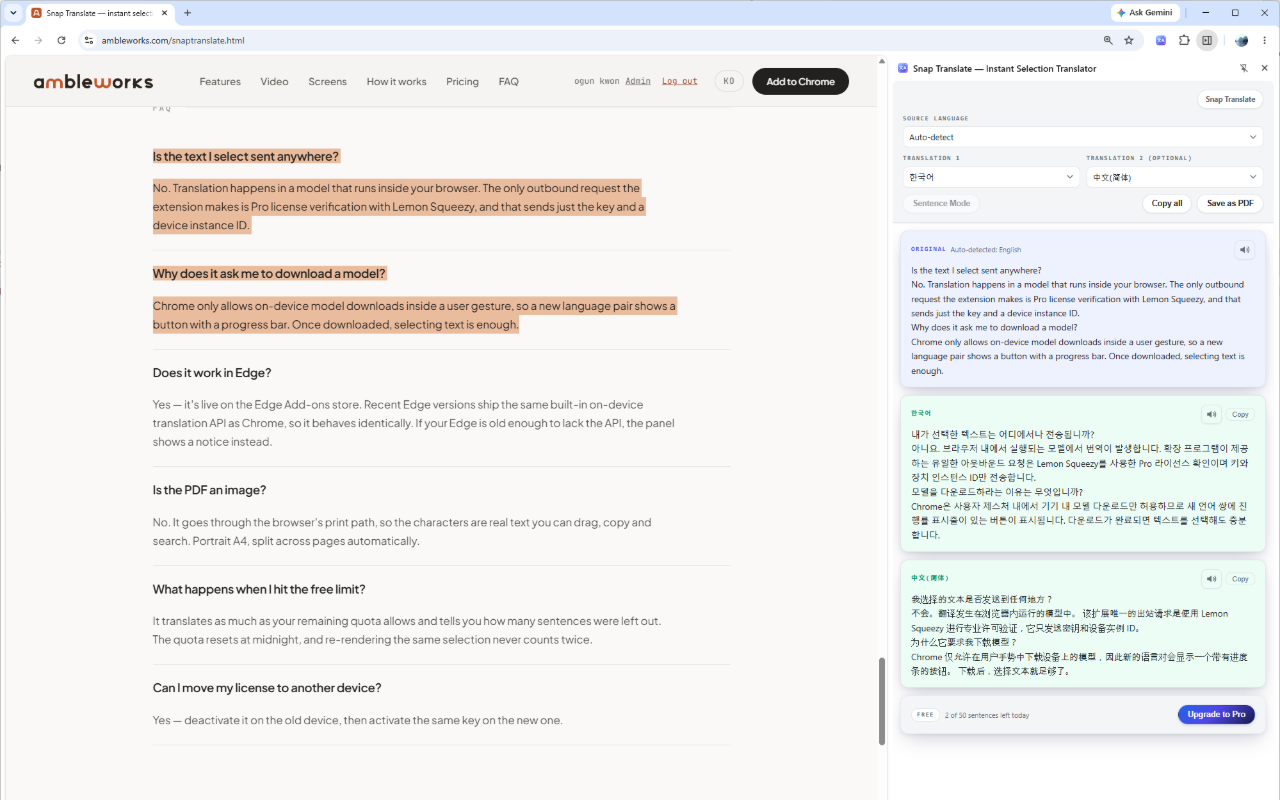
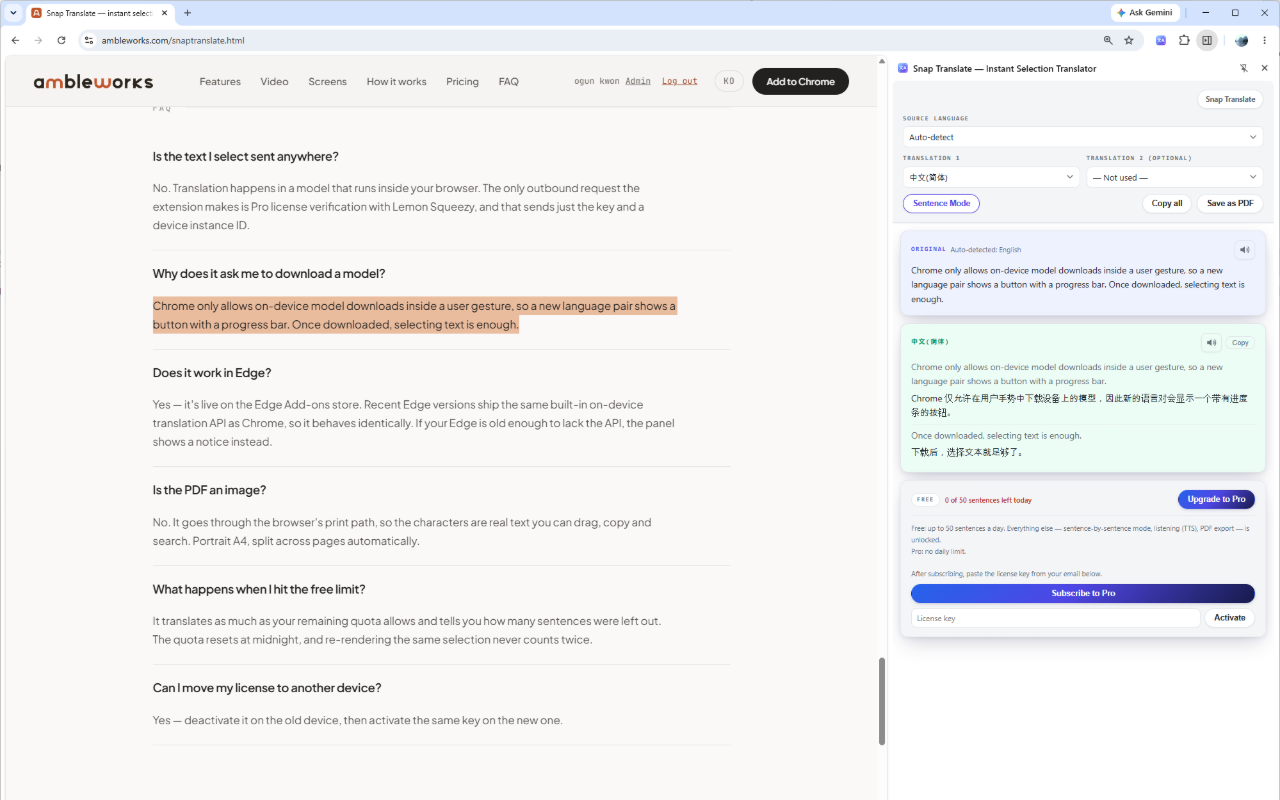
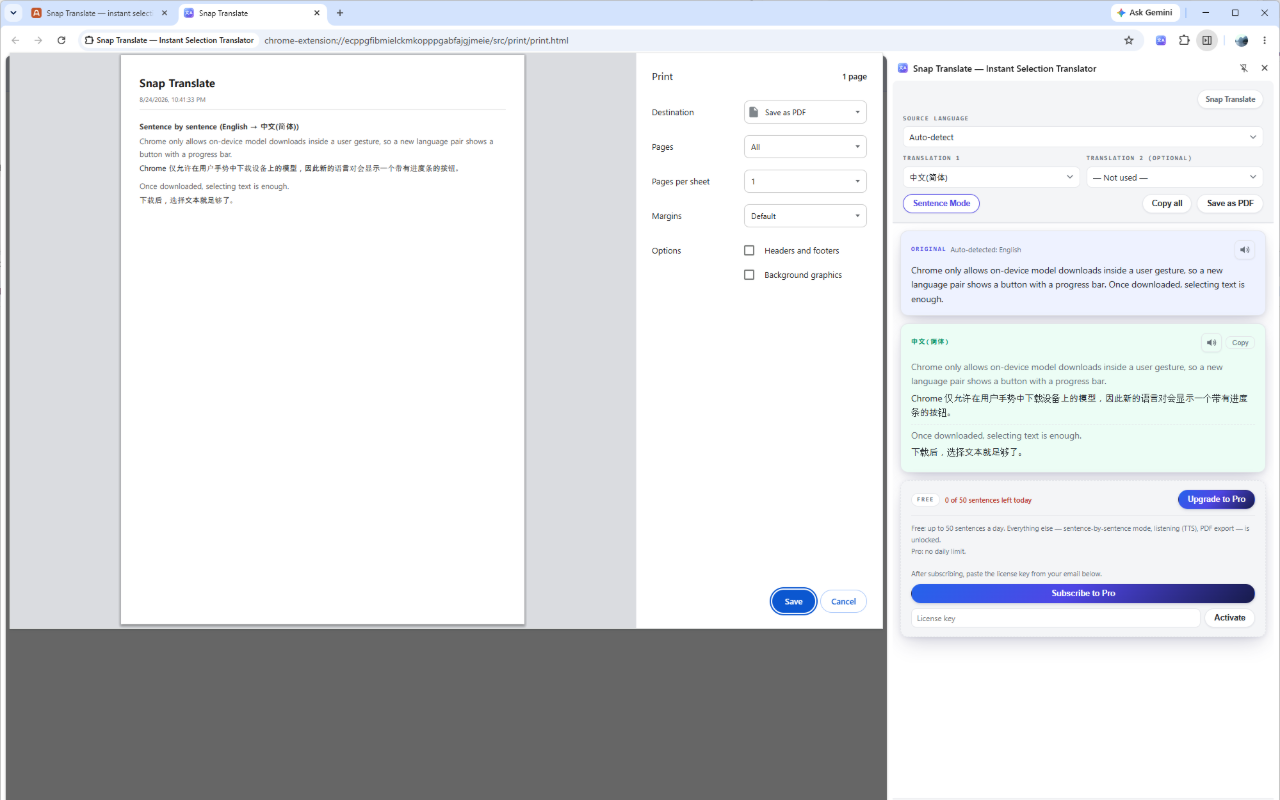
전부 무료입니다. 가입하면 한도도 없습니다.All free. Sign up and there is no cap either.
문장 단위 번역, 듣기, PDF 내보내기, 번역 언어 2개 — 무료 플랜에서도 처음부터 모두 쓸 수 있습니다.Sentence mode, listening, PDF export and two target languages are in the free tier from the first minute.
결제 없음 · 카드 없음 · 영구 키는 가입 메일로No payment · no card · permanent key by welcome email
- ·하루 5,000문장5,000 sentences a day, 자정에 초기화, resets at midnight
- ·모든 기능 사용 가능Every feature unlocked
- ·계정도 카드도 필요 없음No account, no card
- ·하루 제한 없음No daily limit
- ·무료 플랜의 모든 기능Everything in Free
- ·가입하면 영구 키가 이메일로 — 결제도 만료도 없음Sign up, the permanent key is emailed — no payment, no expiry
쓰는 브라우저에 설치하세요.Get it for your browser.
Chrome 138 이상, 또는 같은 내장 Translator API를 갖춘 최신 Edge면 됩니다. 설치하고 문장 하나를 드래그하면 끝입니다.Chrome 138 or later, or a recent Edge with the same built-in Translator API. Install, drag one sentence, and you're done.

하루를 조금 돌려주는 작은 도구들.Small tools that give everyone back a little of their day.
매일 반복되는 일을 조금 더 가볍게 만드는 브라우저 확장과 웹 도구. 가능한 것은 모두 사용자의 기기 안에서 처리합니다.Browser extensions and web tools that make daily work lighter — and that keep as much as possible on your own machine.
궁금한 점이나 제안이 있으신가요? 하루 안에 답장합니다.Questions or ideas? We answer within a day.
ambleworksai@gmail.com